1. Upload the PDF
Upload any PDF (pitch decks, brand guides, brochures, annual reports) and Aligno renders it page by page in the browser. There's nothing for you or your client to install. The document is ready for review as soon as you upload it.
Aligno's PDF review tool lets clients pin comments on exact spots. No Adobe Acrobat, no annotated screenshots. Clients open a link, click directly on any page, and formally approve the document when it's ready.
Most PDF review delays come down to a tooling gap between you and your client. You have professional design software. They have a browser. A PDF review tool that runs in the browser closes that gap.
This works for any document type: pitch decks, brand guides, brochures, print layouts, annual reports. If a client needs to review it and weigh in before it goes further, this workflow replaces the email thread and the annotated PDF chaos.
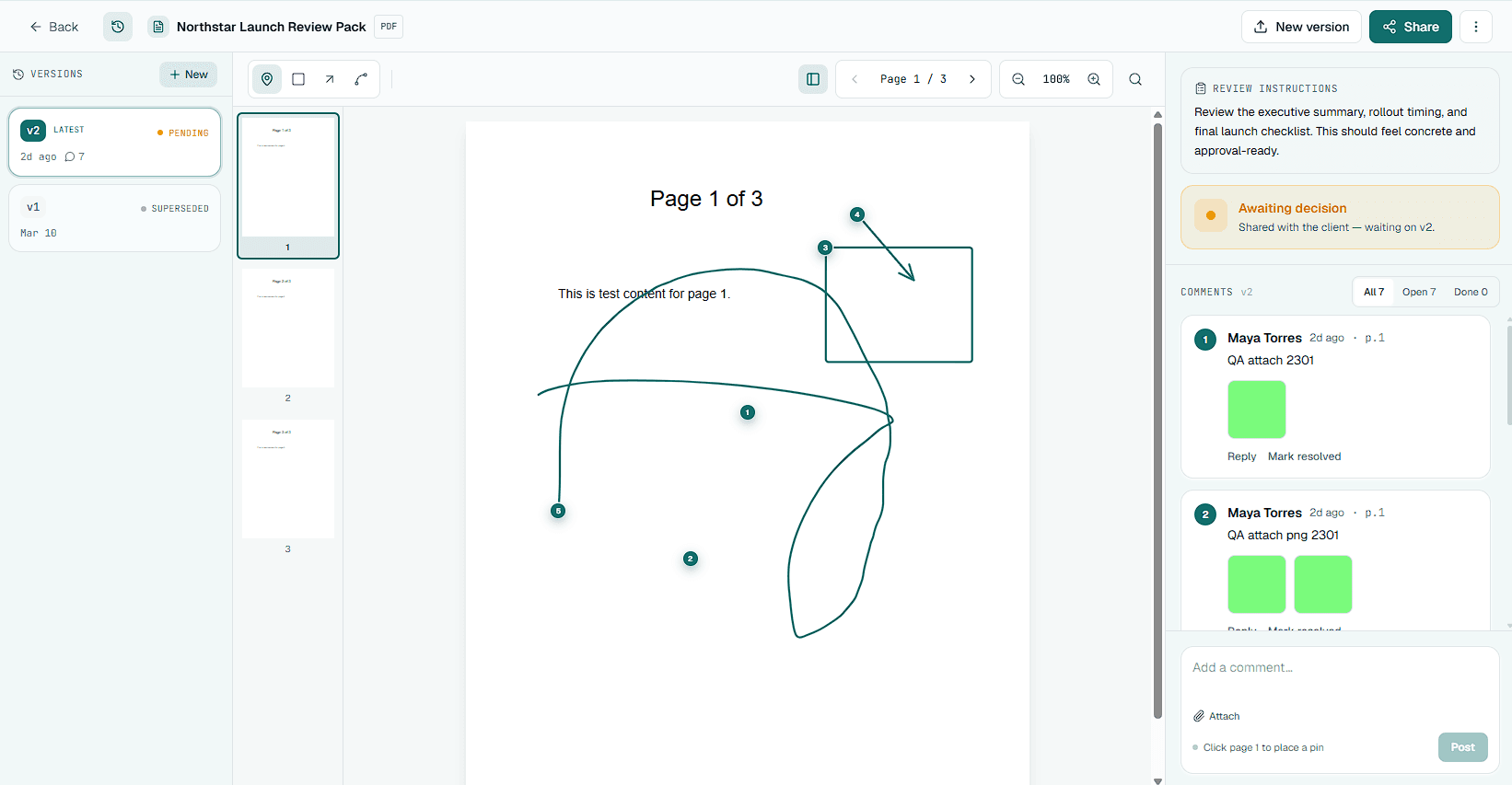
The core problem with PDF feedback over email is that comments lose their spatial context. When a client describes a location in words, you have to interpret what they meant before you can act on it. Pinned comments take the guesswork out by anchoring each piece of feedback to an exact coordinate on an exact page.
For multi-page documents, page-specific anchoring matters even more. A brochure reviewer saying "the chart on page 7" might mean the seventh page of the document or the third page of a section. Pinned comments make the location unambiguous.
All comments live in a single timeline. You can filter by page and see what's resolved versus what's still open, without toggling between email threads and annotated PDF copies.
The sequence below replaces the standard email-based PDF review loop. It drops the software barrier for clients and clears up version confusion. It also adds a formal approval step that most email-based processes skip entirely.
Upload any PDF (pitch decks, brand guides, brochures, annual reports) and Aligno renders it page by page in the browser. There's nothing for you or your client to install. The document is ready for review as soon as you upload it.
Send a single review link. The client clicks it, sees the full PDF in their browser, and can page through it right away. There's no account to create and no software to download. Less friction up front means feedback comes back faster.
Instead of circling things in MS Paint or describing a page location in an email, clients click straight on the page to pin a comment or draw a box, arrow, or freehand mark on the exact spot. Each comment is anchored to a coordinate on a specific page, so there's no guessing about what they're pointing at.
Work through feedback round by round. Mark comments as resolved as you handle them. Both you and the client can see what's done and what's still open, without rereading an entire thread or comparing annotated PDF copies.
When the document is ready, ask the client for formal approval. They click Approve or Request Changes against the exact version they reviewed. You get a timestamped record tied to a specific PDF, not a vague email that says 'looks good.'
The biggest gains come from projects where document review is currently happening over email, where multiple stakeholders need to comment, or where final approval needs to be documented before going to print or production.
For your first PDF review in Aligno, pick a document currently going through an email-based review process. Compare how specific the feedback is against how many follow-up clarification messages you needed, then check how long it took to reach sign-off.
Most teams see feedback quality jump right away because the medium forces spatial precision. Clients who used to write "fix the chart" now click on the chart and write the same message, this time with an exact location attached.
The traditional PDF review workflow depends on your client having usable annotation software. In practice, most clients use a basic PDF viewer with no annotation capability, or they screenshot the page and draw on it in a photo editor. Both approaches create a translation burden: you receive an annotated screenshot and spend time figuring out what the client meant before you can address it.
Browser-based PDF review removes the software requirement entirely. The client opens a link. The document renders in the browser. They click on the page to leave a comment. That comment lands in an exact spot, gets a timestamp, and shows up for everyone in the review. Nothing to install and no compatibility issues. There are no screenshots to decode afterward.
The second benefit is version control. Email-based PDF review creates version confusion because attachments are static. The client's copy of the PDF stops updating the moment they download it. A share-link review always shows the current version by default, and previous versions with their attached comments stay around for reference.
The third benefit is the approval record, and most designers undervalue it until they need it. When a client clicks Approve on a document in Aligno, that decision is logged against the exact version they reviewed. If a client later disputes what was approved before the document went to print, you have a precise record to point to instead of a vague email thread to search through. On Pro, you can export the comments and the approval history for a document as a CSV or a client-ready PDF.
It is used to collect structured feedback on PDF documents from clients or stakeholders without requiring annotation software. Reviewers open a link in their browser, click to leave comments pinned to specific spots on specific pages, and optionally give formal approval.
No. Aligno renders PDFs in the browser. Clients open a share link and review directly, with no software to install and no account to create. PDF reader compatibility stops being your problem.
Yes. Each comment is pinned to a coordinate on a specific page. When you view the comment list, it shows exactly which page and where on the page each comment was left. The common problem of 'the third page' being ambiguous is eliminated.
Annotated PDFs create multiple versions, one per reviewer. You end up merging feedback from three files with inconsistent annotations and no way to track what's been handled. Aligno keeps all feedback in one place, linked to one document, with a clear resolved or open state for each comment.
Any multi-page document works: pitch decks, brochures, brand guides, annual reports, legal documents, print layouts, and packaging files. The workflow is especially useful for documents that need sign-off from a client or stakeholder before going to print or publication.
Yes. When you update the document, upload a new version. Previous comments stay tied to the version they were left on. The client always sees the latest by default, but the full revision history is preserved for reference.
Aligno supports images, PDFs, videos, and webpages in the same workspace.
Upload a PDF, share the link with your client, and compare the quality and speed of feedback you receive. If comments are more specific and sign-off comes faster, the workflow is doing its job.
Start Free