Client sign-off on live websites. No script, no extension, no client login.
Paste a URL and send one link. Your client pins comments on the real page and approves the exact version they saw. Works on staging, on production, or on a site your agency does not control yet.
Also works for mockups, PDFs, and video, in the same project as the site.
Featured Guide
How a live-site review runs in Aligno
From pasted URL to signed-off version: the review cycle, the viewport switch, the export, and the questions agencies ask before they move a client site over.
Website sign-off gets stuck between tools
Email threads, screenshot markups, and bug trackers are not built for a client signing off a live site. Aligno is.
The Old Way
- ✕Feedback arrives as screenshots in an email thread
- ✕Approvals are implied, not explicit
- ✕"I approved the staging site, not this one"
- ✕Nobody can find the latest link
The Aligno Way
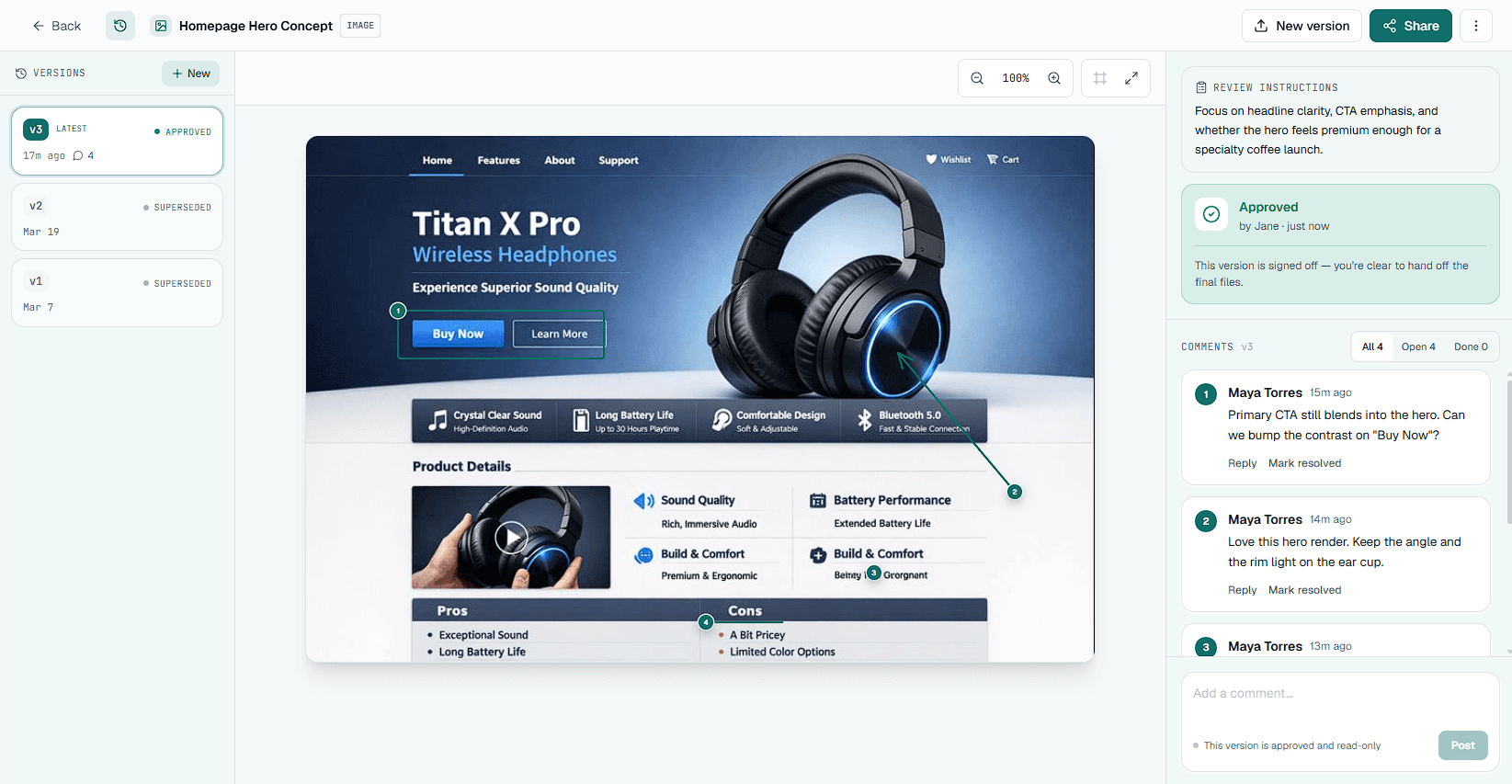
- ✓One review link per site, nothing installed on it
- ✓Comments pinned on the live page, per viewport
- ✓Explicit Approve or Request Changes
- ✓Every decision tied to a version, with a snapshot
Built for sign-off, not bug tracking
A bug tracker hands your client a ticket board. Aligno hands them one link and one decision. We left out the project suite on purpose.
Email and screenshots
Feedback is scattered, approvals are implied, and nobody is sure which version of the site the client was looking at.
Bug trackers and widgets
Built for developers: a script on the site, a task board, and a ticket for every comment. Clients need a link and an Approve button.
Aligno approval flow
One link, no script, no client account, and an explicit Approve or Request Changes on each version of the site.
Three steps to a signed-off site
You don't need a manual to use Aligno. Neither do your clients.
1. Paste the URL
Staging, production, or a site you do not control yet. Nothing gets installed on it. You can also upload an image, PDF, or video.
2. Share one link
Your client opens it in any browser and pins comments on the live page, on desktop or mobile widths. No account, no extension.
3. Get sign-off
An explicit Approve or Request Changes on the version they saw. On Pro, export the comments and the decision as a PDF for your records.
Create a free account, paste a client site, and send a review link. No credit card required.
A tool that earns trust by staying focused
No fake logos. No inflated stats. A clear approval workflow built for agencies that keep client sites running.
Approval clarity
Every version gets an explicit Approve or Request Changes decision.
Client-ready by default
One review link, no client accounts, and comments pinned to the exact spot on the page.
Works on any site
No script on the client's site and no extension for the reviewer, so WordPress, Webflow, Shopify, and hand-built sites all open the same way.
Explore Aligno by use case
Live websites first. The same sign-off workflow also covers the mockups, PDFs, and video that travel with a site project.
Flat pricing for the whole agency
Start free with one live website, unlimited pages and reviewers. Pro and Studio are one flat price for your team, and your clients never pay or sign in.
Free
One live website, unlimited pages and reviewers
- 1 live website, or 1 image, PDF, or video
- Unlimited pages and reviewers
- Unlimited client comments
- 200 MB storage
- Latest approval status only
Covers one site or one file. Upgrade when the second client site comes in.
Pro
Billed $180.00 per year, save 17%
For an agency with a book of client sites
Everything in Free, plus
- Unlimited projects
- Unlimited assets
- 100 GB storage
- Full approval history
- Comment & sign-off export (CSV + PDF)
- Custom branding (your logo, no Aligno badge)
- Send share links by email
- Review due dates with automatic reminders
- Priority support
- Up to 3 team members
Prices exclude VAT where applicable.
Studio
Billed $480.00 per year, save 17%
For agencies with a team of up to 10
Everything in Pro, plus
- 1 TB storage
- Up to 10 team members
- Dedicated support
- Onboarding assistance
Prices exclude VAT where applicable.
Featured on

Frequently asked questions
The short answers agencies want before moving a client site over.
Do my clients need an account to leave feedback or approve?
No. Clients open a single share link in any browser, pin comments on the page, and click Approve or Request Changes. There is no account to create and nothing to log in to. This works on every plan, including the free one.
Do I need to add a script or an extension to the client's site?
No. Aligno loads the page through its own review proxy, so nothing is installed on the site and the reviewer needs nothing beyond a browser. That is also why it works on a site your agency does not control yet, such as a prospect's current website.
Does it work on staging as well as the live site?
Yes, as long as the URL is reachable from the internet. A production site, a public staging URL, and a site you do not manage yet all open the same way: paste the address and share the link.
Is there a free plan?
Yes. The free plan covers one live website with unlimited pages and unlimited reviewers, and needs no credit card. It is enough to run one real client review before you decide to pay.
How do I know which version a client approved?
Every approval is an explicit decision tied to the exact version the client reviewed, recorded with a timestamp. For websites, earlier versions keep a snapshot of the page as it was, so a comment from last month still points at last month's page. When a scope question comes up later, the record is in Aligno instead of buried in an email thread.
What else can I collect feedback on?
Images (PNG, JPG, WebP, GIF), PDFs, and video files (MP4, MOV, WebM up to 100MB, with comments pinned to a timestamp). Mockups, print work, and video walkthroughs sit in the same project as the live site.
How is Aligno different from a bug tracker like BugHerd or Marker.io?
Those tools are built for developers: a script on the site, a ticket board, and a Jira or Asana connection. Aligno is built for the client decision. Your client gets one link, pins comments on the page, and clicks Approve, and you keep a sign-off record you can export.
Can clients draw on the page, or just comment?
Clients can drop a pin or draw a box, an arrow, or a freehand mark directly on the page, so feedback is anchored to exactly what they mean. Markup works on live websites, images, PDFs, and video, on every plan.
Can I add my own branding or invite my team?
Yes, on a paid plan. You can upload your logo and hide the Aligno badge on client-facing review pages, and invite teammates as collaborators (up to 3 on Pro, 10 on Studio) who share one account and plan.
Ready for sign-off on your next client site?
Paste the URL, share one link, and get a decision you can point to later. Built for web agencies with client sites to keep running.
No credit card required.