Design feedback for freelancers: get clear client sign-off
Design feedback for freelancers shouldn't mean chasing clients through email. Share one link and collect pinned comments, then get an explicit approval you can point to later. Revision loops end and scope creep doesn't take hold.
Get started for freeLast updated: July 2026
Why client feedback breaks down for freelancers
For a solo freelancer or small studio, the problem is rarely the design. It's the process around it. Client feedback gets buried in email and the notes are vague. Nobody ever formally signs off. Each gap adds another revision round, and without a clear approval at the end, “one more tweak” quietly becomes unpaid scope.
Feedback buried in email
Clients reply to the wrong thread, reference the wrong version, or send feedback in a voice note you can't search.
Endless revision rounds
Without clear approval, “one more tweak” becomes five. Scope creeps because the client never formally signed off.
Vague feedback
“Make it pop” and “I don't love the vibe” are hard to act on when you can't see what the client is pointing at.
A simple sign-off process for freelancers
Here's how to get client sign-off as a freelancer in five steps. It's the same flow Aligno is built around.
1. Share one link, no account required
Upload your design, PDF, video, or live page and send the client a single share link. They open it in the browser and start reviewing right away. No sign-up, no password to reset, no app to install. Take away that friction and you get feedback today instead of next week.
2. Collect pinned comments in context
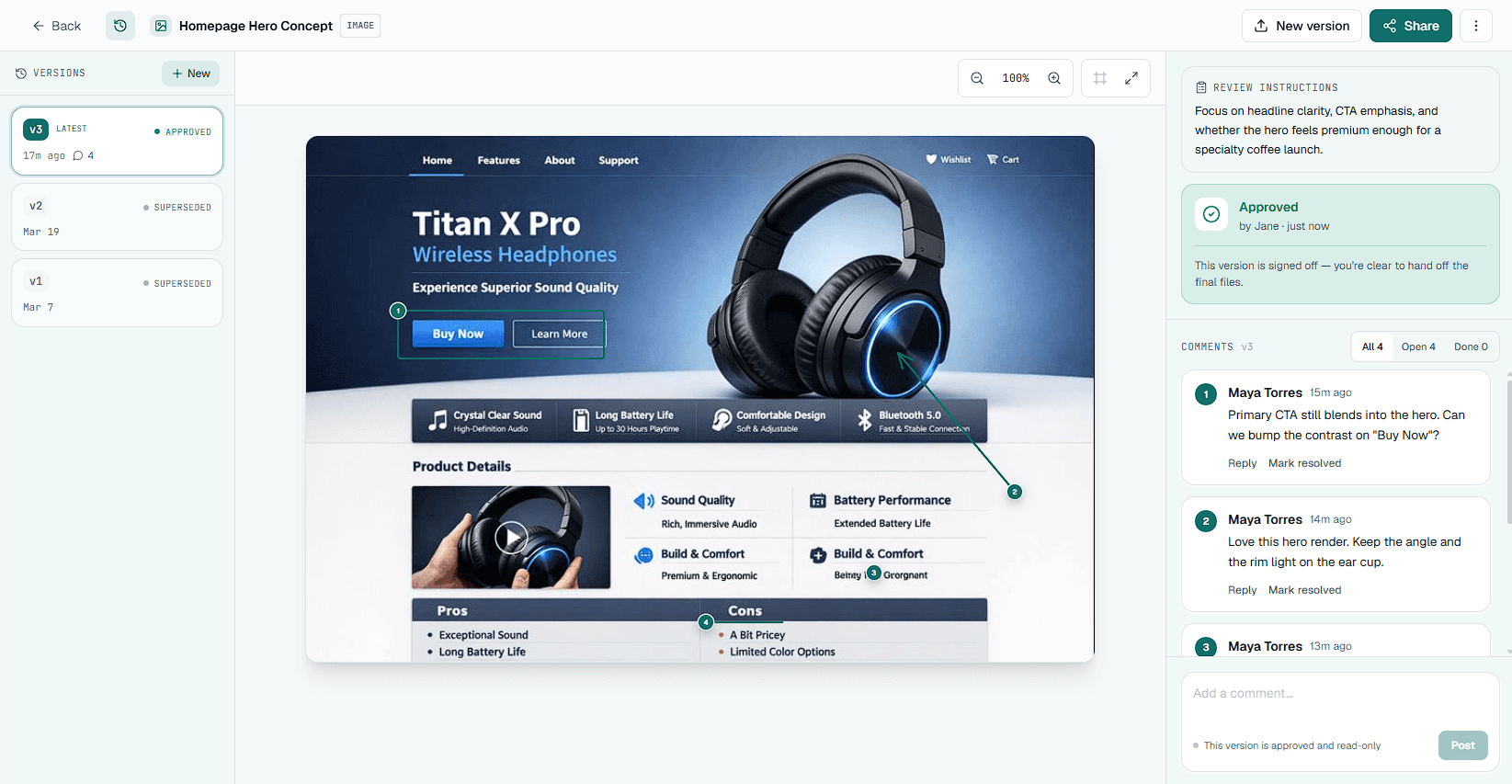
Clients click directly on the spot they mean and pin a comment, or draw a box, arrow, or freehand mark right on the design. Instead of "move the thing on the left" buried in an email, every note is anchored to an exact point, so you know precisely what to change.
3. Resolve feedback as a batch
Work through the comments and ship a revision, closing each note as you go. The thread becomes an action list instead of an open-ended conversation, and the client can see exactly what changed before they decide.
4. Ask for an explicit Approve or Request Changes
When it is ready, the client makes one clear decision: Approve or Request Changes. That removes the ambiguity of a vague "looks good" reply and gives you a definite handoff point for the next phase or the invoice.
5. Keep the record
The approval stays attached to the exact version that was reviewed, with a timestamp. If a request comes in later, you can show what was signed off and when. That is your protection against scope creep.
Before & after: one revision round
Over email
A freelancer emails a logo as an attachment. The client replies with “love it, just the colour feels off.” But on which version? Two more threads appear, one from the client's business partner who was cc'd late. The freelancer guesses, ships a tweak, and weeks later the client asks for a different layout, insisting it was “always part of the brief.” There's nothing to point back to, so the extra work gets done for free.
With a recorded approval trail
The same freelancer shares one link. The client pins “make this teal” directly on the mark; the partner adds a comment on the same view. The freelancer resolves both, the client clicks Approve on that exact version, and it's timestamped. When the layout request arrives later, it's clearly new scope. It's a documented change request to quote, not a free revision to absorb.
What to capture in a design sign-off
A sign-off is only useful if it records the right things. Whatever tool you use, make sure each approval captures:
Which version was approved
Sign-off should point to a specific version, not "the design" in general. Later revisions are then clearly new work.
The date and time of approval
A timestamp turns a fuzzy "didn't we agree on this?" into a fact you can both refer back to.
Who approved it
Record the actual person who clicked Approve. This helps when several stakeholders are involved on the client side.
What was explicitly out of scope
Note anything parked for later. When it comes back around, it is a documented change request, not a free revision.
How Aligno helps freelancers specifically
No client accounts
Clients hate creating accounts for a tool they'll use once. Aligno gives them a no-account review link, and why clients hate creating accounts is exactly why they respond faster.
Pinned comments
Every piece of feedback is tied to a specific spot on the design, so you spend revision rounds fixing things rather than decoding what “the thing on the left” meant.
A recorded approval trail
When a client clicks Approve, it's logged against that version. It's the backbone of a reliable design approval process and the simplest way to get client sign-off you can stand behind. On a paid plan you can export the comments and approval history for an asset as a CSV or a client-ready PDF.
Your brand and your deadlines
On a paid plan you can put your own logo on the client share page and hide the “Made with Aligno” badge, so the review looks like part of your studio. Set a review due date when you share and Aligno reminds the client before it lapses.
Free plan available. See pricing.
Frequently asked questions
Do my clients need an account to leave feedback?
No. Clients review from a secure share link in their browser, with no account, password, or install required. Freelancers see faster turnaround because external clients respond more readily when they can comment immediately instead of creating yet another login just to review one project.
How do I stop scope creep as a freelancer?
Get an explicit, version-specific approval before you consider a phase done, and keep the record. Because each sign-off is tied to the exact version that was reviewed and the date it was approved, a later request is easy to classify as net-new scope rather than an unresolved comment. You can then price or schedule it instead of absorbing it.
What if a client won't formally approve?
Make approving the easy path: resolve every open comment first, then ask for a single Approve or Request Changes decision so there is nothing left to deliberate. If a client still goes quiet, the resolved-comment trail and the share link give you a clear, documented place to follow up from. That beats chasing a decision across email threads.
Stop chasing approvals
Start collecting clear design feedback today. Free plan available.
Get started for free