Image review
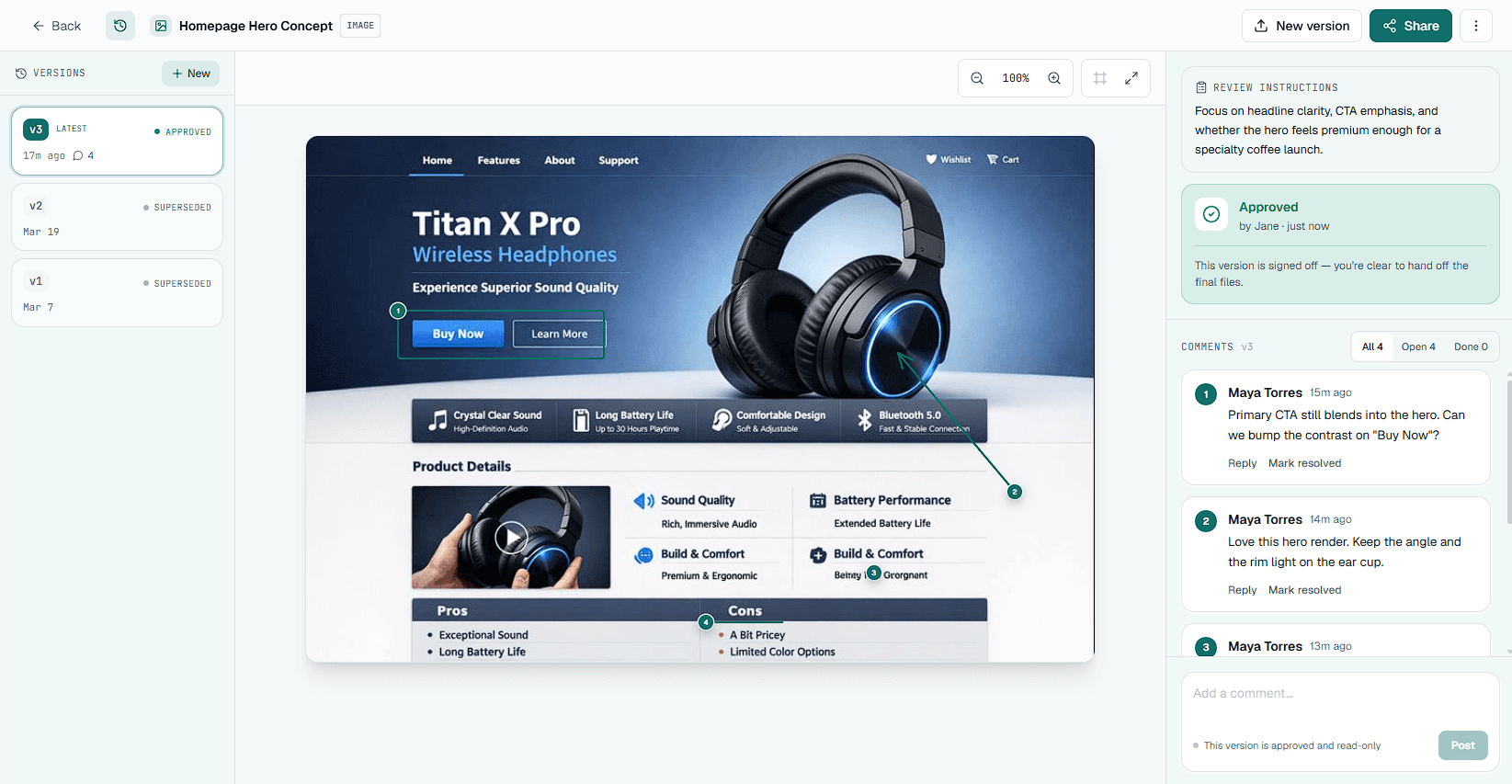
Upload design files in JPG, PNG, WebP, or GIF format. Clients pin comments or draw box, arrow, and freehand markup on exact spots, so feedback on layouts and brand assets lands where they mean it.
JPGPNGWebPGIF
This is the full rundown of Aligno's design feedback tool features: pinned visual comments, recorded approvals, version history, and no-account share links. Each one is built to help you collect a clear client sign-off without the email back-and-forth.
The features that make design review and client sign-off faster and clearer.
In email threads, feedback like “move the button in the top-right” is easy to misread. In Aligno, reviewers click directly on the work to drop a comment pin, or draw a box, arrow, or freehand mark exactly where they mean it. Every mark stays anchored to its spot, whether that's an image, a PDF page, a video frame, or a live web element. You act on the exact note instead of guessing what a vague comment refers to.
Comments alone never add up to a clear “yes.” A client can leave notes and still claim later they never signed off. Aligno makes approval its own action. The client chooses Approve or Request Changes, and the decision is recorded against the exact version they reviewed, with a timestamp. You get a sign-off you can point to when a “I never approved that” dispute comes up.
Across revision rounds it is easy to lose track of which version a client actually saw. Aligno ties every comment and approval to a specific version, so you always know what was reviewed and who approved it. Upload a new version and the earlier history stays intact, so you and your client keep an accountable trail for the whole project.
Most tools ask clients to create an account before they can comment, and every extra step costs you a reply. Aligno skips all of that. Clients open a share link and start pinning feedback right away, with no sign-up and no password to remember. Fewer steps between you and a decision means faster turnaround on every review.
You shouldn't have to sit in the dashboard waiting for a reply. Aligno emails you when a client comments, replies, approves, or requests changes, and you can turn each type on or off independently. Prefer your team chat? Connect Slack to post the same activity into your channels, connect Figma to import frames as review assets, or wire Aligno into Zapier and thousands of apps with the REST API. There's also a Chrome extension in beta for reviewing live sites in place. Feedback reaches you where you already work.
The share link is where your client meets your work, so it should look like yours. On a paid plan you can upload your own logo and hide the “Powered by Aligno” badge on client-facing review pages and emails. Reviewers see your studio, not ours.
Bring your team into the same account. Invite teammates as collaborators and they work under one shared plan, with the same projects, assets, and billing. Pro includes up to 3 members and Studio up to 10, so an agency can run every client review in one place.
Chasing a client for sign-off is nobody's favourite job. Set a due date when you share an asset and Aligno reminds the reviewer automatically as the deadline gets close and after it passes. You get an overdue digest so you always know which reviews are still open, without sending the follow-up yourself.
When a project wraps, you often need a record of what was said and approved. Export any asset's full comment thread and decision history as a CSV for your files, or a clean PDF sign-off you can send to the client. The paper trail is there when a “did we ever agree on that?” question comes up months later.
Four asset types, each with its own viewer. Pin comments or draw box, arrow, and freehand markup, including timestamp pins on videos.
Upload design files in JPG, PNG, WebP, or GIF format. Clients pin comments or draw box, arrow, and freehand markup on exact spots, so feedback on layouts and brand assets lands where they mean it.
Multi-page PDFs with per-page commenting and approval tracking. Ideal for proposals and brand guidelines.
Review live URLs as they really render. Client comments reflect the actual typography and responsive behaviour, not a static screenshot.
Upload MP4, MOV, or WebM files up to 100MB. Clients scrub the timeline and pin comments at exact timestamps, so feedback stays anchored to the frame they were watching.
Go deeper on each asset type: website feedback, PDF proofing, and video review.
Manage who sees what, and for how long, without adding friction for your clients.
Every feature serves one path: from a file to a recorded client approval, in four steps.
Add an image, multi-page PDF, video, or a live webpage URL. Each asset gets its own viewer and feedback thread.
Send a single share link. Clients open it and review instantly, with no account required.
Clients drop comments directly on the work, anchored in context. You reply in-thread and resolve them as a batch.
When it's right, the client clicks Approve, recorded against that exact version. That's your sign-off.
Aligno is deliberately not an all-in-one project management suite. It won't replace Notion, Linear, Jira, or your design tool, and it doesn't try to handle real-time co-editing or internal task boards. It does one job well. It gets you clear, in-context feedback and a recorded approval from external clients who don't want to create an account. Aligno slots alongside the tools you already use instead of asking you to move your whole workflow into yet another platform.
Common questions about Aligno's design review and approval features.
Start free with one full client review. See how pinned feedback and explicit approvals compare to your current email workflow.
Start free