What Clients See
A designer's guide to the client experience. Know exactly what your clients see and can do when you share a design.
The Share Page Experience
When a client opens your share link, they see a clean, focused view of your design. The interface is simple enough that most clients figure it out in seconds.
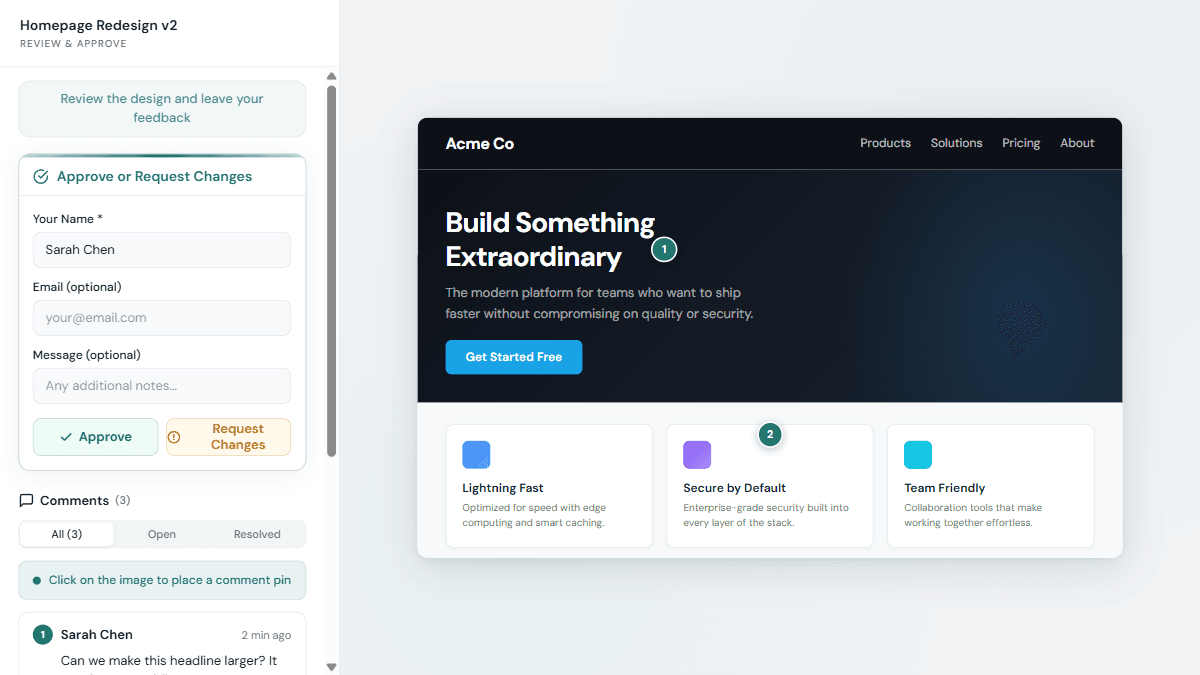
The page shows:
- Your design, front and center, whether it's an image, PDF, video, or webpage
- Comment tools, a sidebar or panel for leaving feedback
- Approval buttons, clear options to approve or request changes
- Their name field, so feedback is attributed (no account needed)
What Clients CAN Do
Knowing Whether They Opened It
Silence after you send a link is ambiguous: it might mean the client is still thinking, or it might mean they never opened it. Aligno removes that ambiguity. Every shared design tells you whether the review link has been opened and when it was last opened, on both the asset card in your dashboard and the review page itself. Before anyone has been there it simply reads "Not opened yet".
You also get one email the first time a client opens a design — once per design, not once per visit. You can turn it off under Notifications in your account, or from the link in the email itself.
A New since your last visit marker on the comment list works alongside it. You always see what has arrived since you last looked. A reviewer sees the same once they have left a comment, which is the point at which Aligno has a way to remember them at all. Neither side is shown their own comments as new. This is on every plan, including Free.
What Clients CANNOT Do
Clients have a focused, limited view. That's on purpose. It keeps the experience simple and prevents accidents.
Optional Share Settings
You can customize what clients see and how they access the share link:
- Password protection: require a password before viewing. Useful for sensitive work.
- Expiry date: automatically disable the link after a certain date. Good for time-sensitive reviews.
- Disable comments: turn off commenting if you only need an approval, not feedback.
- Review due date: set a deadline and Aligno reminds the reviewer automatically as it approaches (paid plans).