Client feedback tool for web agencies
For studios that keep client sites running: care plans, retainers, and the monthly batch of landing pages. One link per site, comments pinned on the live page, and a sign-off you can point to when the scope question comes up later. Nothing to install on the site, no login for the client.
Get started for freeAlso works for the mockups, PDFs, and video that travel with a site.
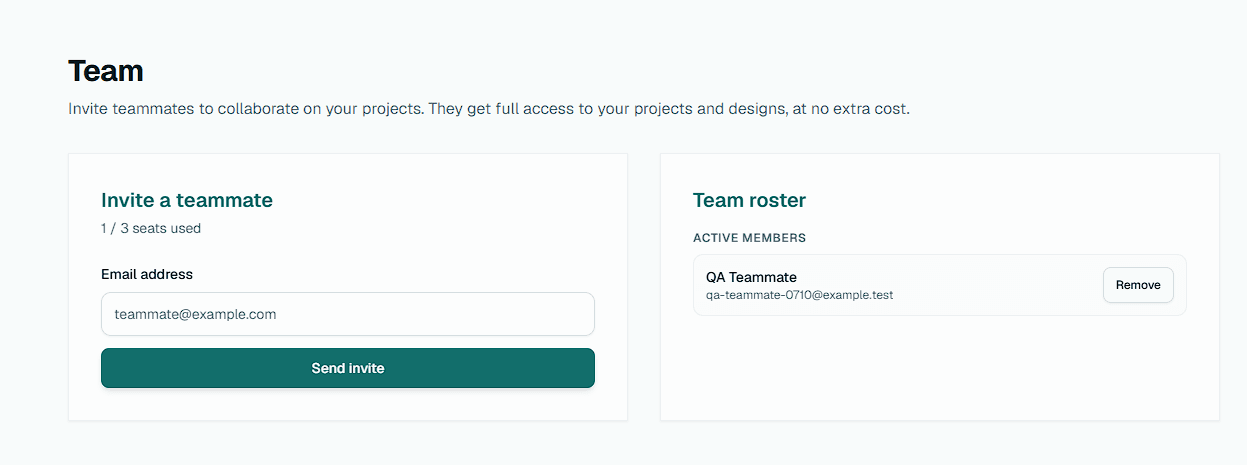
Invite your designers and account leads onto one shared account.
What goes wrong on a retainer
Feedback arrives as screenshots
A Loom, three cropped screenshots, and “the thing on the left”. Someone on your side spends the morning working out which page and which width the client meant.
The site moved on, the record did not
By month four nobody can show what the client approved in month two. The email thread has the words, not the page.
Silence is not approval
A page waits on a care-plan client who never replies. The work is done, the invoice is not, and the ambiguity costs billable hours.
How agencies use Aligno
1. Paste the site URL
Staging or production, on any platform. Group sites by client. Add the mockups, PDFs, or video for the same project alongside.
2. Share one link
The client opens it in their browser and pins comments on the live page at desktop or phone width. No signup, no extension.
3. Track sign-off per site
See which sites are approved, which need changes, and which are still waiting on the client, across the whole book in one dashboard.
Why agencies choose Aligno
Nothing to install, on either side
No script on the client's site and no extension for the reviewer. Aligno loads the page through its own proxy, so it works on WordPress, Webflow, Shopify, and hand-built sites, and on a site you do not control yet.
Versions keep their snapshot
Publish a new version when the page changes. The earlier version keeps a snapshot of the page as it was reviewed, so last quarter's comments still point at last quarter's page.
A sign-off you can export
When a client approves, it is explicit, timestamped, and tied to the version they saw. On Pro and Studio, export the comments and the decision history as a CSV or a client-ready PDF for the project file.
Reminders do the chasing
Set a review due date when you share. The client gets a reminder before the deadline and a follow-up if it slips, and you get a digest of sites still waiting on a decision.
One flat price for the team
Invite designers and account leads as collaborators on one shared plan (up to 3 seats on Pro, up to 10 on Studio). Clients never count. On Pro and Studio you can also put your own logo on client review pages and hide the Aligno badge.
Also covers the rest of the project
The homepage mockup, the print brochure, and the explainer video sit in the same client project as the live site, with the same share link flow and the same approval record.
Running client sites across a retainer book
The hard part of agency feedback is rarely a single review. It is running twenty client sites at once, each with its own idea of what “done” means, without losing the thread on any of them. When every client sends changes in their own channel, the agency absorbs the cost of translating it all back into the work.
Putting review on one share link per site removes that overhead. The client pins a comment or draws a box on the exact element, at the width they were looking at, so an account lead can pick up a site they have never touched and see what was said and what is still open. Nothing lives in a private inbox that only one person can find.
Approvals are where agencies lose billable hours. An explicit, timestamped sign-off tied to a specific version turns “I think they approved it” into a record you can point to during a scope or billing conversation. When a client asks for a change after sign-off, that boundary is documented, which protects the margin on retainer and fixed-fee work alike.
Because nothing is installed on the site, the same link works one step earlier in the relationship. Open a prospect's current site, pin your redesign notes on it, and send them the link before the first call. The review they get is the review their own clients will get.
Client reviewers never create accounts or pay for seats, so the model scales cleanly. Onboarding a new client costs nothing and adds no license. You send a link and they review. Tooling cost stays flat as the roster grows, and the review experience is identical for every client regardless of how technical they are.
Agency FAQ
Do our clients need to create accounts to leave feedback?
No. Each site gets a share link, and the client reviews and approves from the browser with no signup, password, or onboarding. For an agency with thirty retainer clients, that removes the biggest source of review friction and the support tickets that come with it.
Do we have to put a script on the client's site?
No. Aligno loads the page through its own review proxy, so nothing is installed on the site and nothing is installed in the client's browser. That is what makes it work on a site you do not control yet, such as a prospect's current website, and on a client's production site without touching their deploy.
Does it work with WordPress, Webflow, and Shopify?
Yes. Aligno reviews the rendered page, not a plugin inside the platform, so a WordPress care-plan site, a Webflow build, and a Shopify store all open the same way: paste the URL. The same project can hold the mockups, PDFs, and video that travel with the site.
What happens to old comments when we publish a new version of the site?
Earlier versions keep a snapshot of the page as it was reviewed, so the comments and the sign-off stay attached to what the client actually saw. When a client asks in month four why the hero changed in month two, the record is there.
Are reviewer seats charged per client?
No. Aligno is one flat price per agency. Client reviewers are always free and unlimited, so a tenth or a fiftieth client does not change the bill. Pro includes up to 3 seats for your own team and Studio up to 10.
Can we organize reviews by client and by site?
Yes. Group assets into projects and keep each client's sites and deliverables in their own space, so feedback and approvals never get crossed between accounts. Team members see the same projects from one shared account.
How is Aligno different from an all-in-one agency platform?
All-in-one platforms bundle feedback with task management, time tracking, and client portals, then ask you to move your whole operation into them. Aligno does only the client review-and-approval step and sits next to the project management and invoicing tools you already use. Review activity posts to Slack, frames import from Figma, and a Zapier connection and REST API cover the rest.
Can we export the feedback and approval history for our records?
Yes, on paid plans. Any site's comments and decision history export as a CSV for your own records, or as a client-ready PDF sign-off document with the pins numbered the way the reviewer saw them. When a scope discussion comes up months after delivery, the record is one download away.
Move one client site over and see
The free plan covers one live website with unlimited pages and reviewers. No credit card.
Get started for free